Content curation is an essential piece of any marketing strategy. Put simply, it is the process of gathering information relevant to a particular topic or area of interest.
It allows you to build authority in your industry. When you curate content, you’re adding your voice to a collection of content that’s already been created.
By collecting and sharing information, you’re taking the work of searching for information from your audience, saving them time, while simultaneously providing them value.
This enables you to be recognized as an expert in your field. When you share content that you’ve found helpful, chances are your audience will benefit from it too. Continuing to share information encourages your audience to follow you as a source of great content and knowledge.
It's Easy
Curating content is easier than creating your own content, and it means you’re able to share content much more frequently. This is especially beneficial for social media. Content curation is a key element of social media marketing.
It’s really important to post information from others in your industry as to not appear selfish. You might be an expert but you’re not the only expert. Share the wealth of information with your fans!
Sharing content also gives you a chance to grow your network. It allows for more links from your page to other relevant pages. This is not only beneficial for SEO, but for the authors of the content you are sharing. Once you share and credit enough content, those in your industry will start sharing your original content as well.
The social media rule of thirds is a great focus for content creation. Try splitting your content into three parts:
1/3 branded content
1/3 curated content
1/3 engagement and interaction
This allows for a steady stream in your content strategy. Make sure you’ve got a clear goal as to why you’re sharing specific content as well.
7 Free Tools for Curating Content:
Feedly
Feedly is a Minimalist design RSS feed. Feedly lets you to create topics and add to each feed, keeping things very organized. Feedly also suggests blogs to follow based on a broad range of topics. It’s super easy to use and allows for 100 free feeds.
Pocket
Pocket allows you to save articles, videos and stories to read later. You can access your content offline anytime. Pocket integrates with 1500+ other apps. It’s free extension allows you to save anything on your computer and read it on your phone or tablet later.
NewsBlur
NewsBlur is another RSS feed. With its new features you can now highlight and take notes directly in the articles via the website. NewsBlur learns your likes and dislikes over time and has a more sophisticated filtering than other RSS feeds. The free version allows for 64 feeds.
List.ly
List.ly may be a bit dated, but has tons of great articles and lists you can add directly to your blog. You can create lists on this website that other people can interact with as well, fostering more engagement.
Instapaper
Instapaper boasts a very minimalistic, newspaper like design. Save your favorite articles and read them distraction free anytime, anywhere, offline. The free version allows you to take 5 notes per month and highlight within articles. It also allows you to save videos.
Inoreader
Inoreader‘s free version allows for 150 subscriptions. This tool even allows you to search within your subscriptions. Rather than clog up your email’s inbox you can directly receive blog updates through the website. You can also cross-use tools and save articles directly to Pocket and Evernote. Inoreader allows you to search through loads of articles based on specific subjects and add them to your feeds. There are several automation services as well you can add to if you wanted to upgrade your plan.
Flowreader
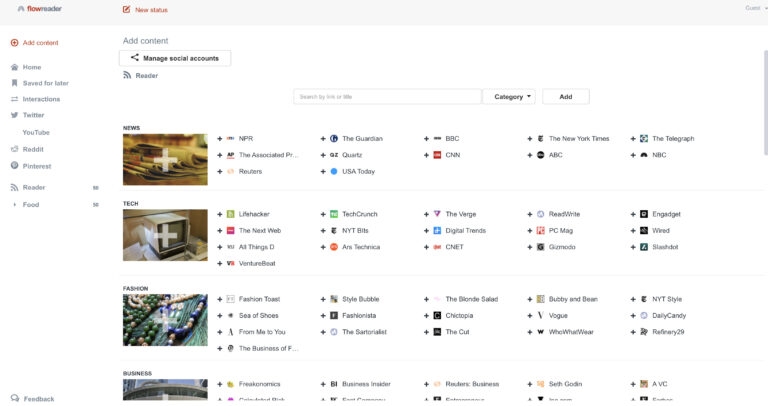
Flowreader lets you choose several categories and follow articles based on those categories. It’s social media integrations let you view your feeds from Twitter, Youtube, Reddit and Pinterest. Flowreader was designed to take your social profiles and combine them so you no longer have to switch through all the apps and websites and can view them all in once place. Combined with an RSS feed, it gives you social and news in one place.
Conclusion
There are numerous curation resources out there, paid and free- it just depends on your budget. If you’re looking for more information and someone who can curate content for you- hire a content creator or a social media manager to do all the work for you.
Want access to a list of online tools that make running my business 10X easier?